

An ecommerce store can show an order as paid while the bank deposit is lower, delayed or still pending. To reconcile ecommerce payments, match each store order to its payment transaction, then match transactions to the payment provider's payout or settlement batch and finally to the bank statement. Record fees, refunds, disputes, reserves, currency conversion and cash-on-delivery (COD) collections separately. A difference is not automatically missing money: it can be a timing difference or a legitimate deduction.
For UAE ecommerce businesses using Shopify, WooCommerce, payment gateways, marketplaces or couriers, the important question is whether every payment has an explainable outcome. This article gives a practical data map, sample reconciliation, exception workflow and twelve acceptance tests for reviewing a current setup or commissioning a store-to-accounting integration. The worked numbers are illustrative, not a real client or a tax treatment recommendation.
1. Why ecommerce sales and bank deposits do not match
Four amounts are commonly confused: an order's gross total, the amount actually captured by a provider, the provider's net payout and the final deposit in the merchant bank account. These are not necessarily equal on the same date. One payout can aggregate many orders; an order may be partially refunded; a provider may deduct transaction fees or hold a reserve; and a bank may post a payout after the provider labels it deposited.
Shopify's payout documentation distinguishes captured funds, scheduled payouts, payouts sent to a bank and funds actually credited by the bank. It also provides transaction exports and a payout reconciliation report. The distinction between provider status and bank arrival is why matching only a sales dashboard to a bank feed is insufficient. See Shopify's payout details guidance.
The five evidence sets to collect
Start with (1) store orders and order-line adjustments, (2) provider transactions and capture IDs, (3) provider payouts or settlement batches with fee and refund breakdowns, (4) bank deposits with bank reference and currency, and (5) refunds, chargebacks and COD remittances. For marketplaces, include platform settlement statements and commissions. Retain original transaction IDs and timestamps; an order number alone may not uniquely identify every split capture or partial refund.
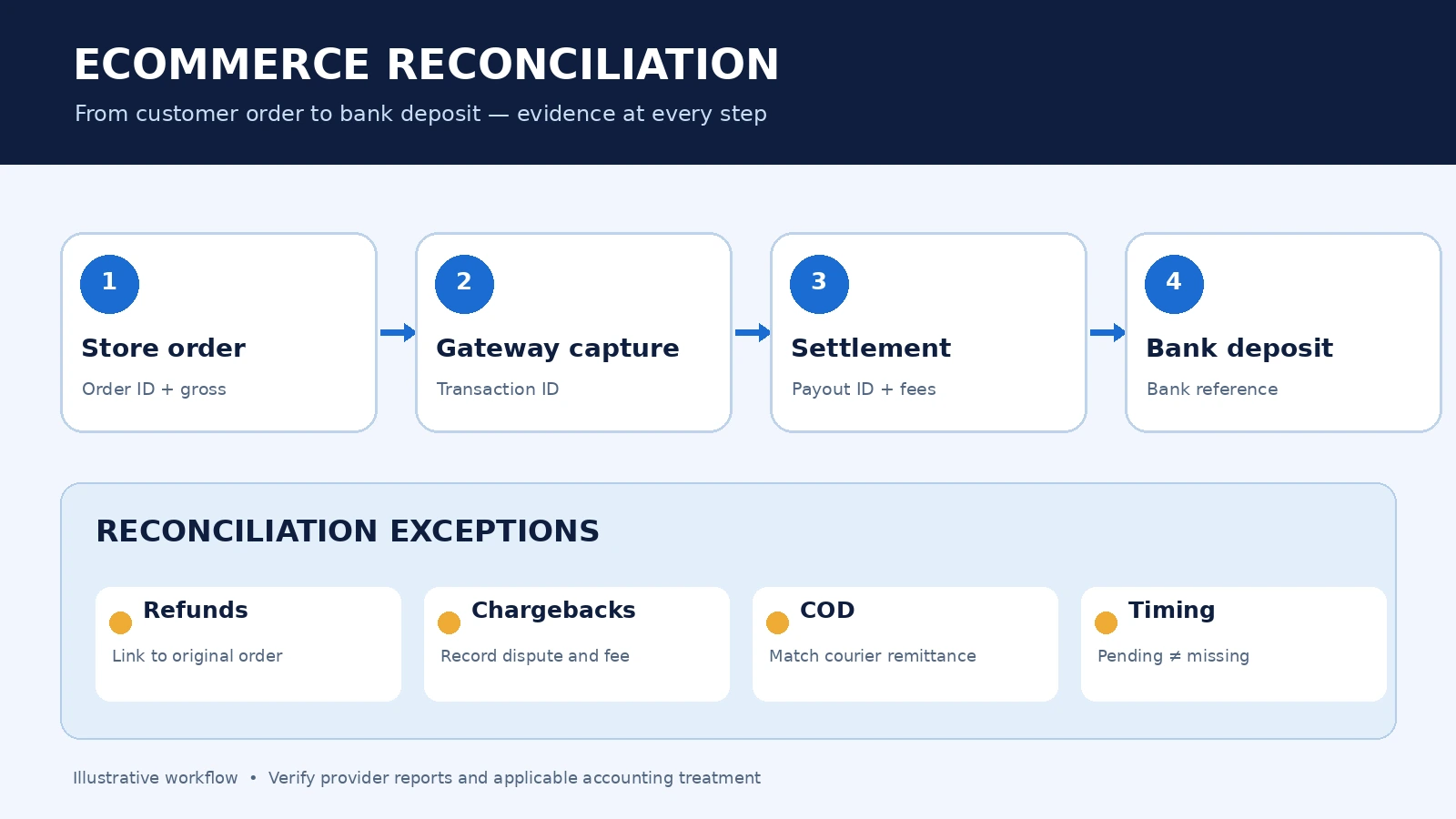
2. The reconciliation chain: order → capture → payout → bank
Step 1: Confirm the store order and its payment state
Extract order ID, creation date, payment method, gross total, discounts, delivery, tax fields, refunded amounts and the payment status. Distinguish paid, authorized-but-not-captured, pending, canceled and partially refunded orders. The order record is evidence of a customer transaction, not necessarily evidence that a bank has received funds.
Step 2: Find the provider transaction
Match the payment transaction using the provider charge or capture reference, not just amount. Keep provider name, transaction ID, transaction date, capture status, currency, gross captured and fee or adjustment references. For WooCommerce, payment gateway behavior depends on the installed provider. WooCommerce's order troubleshooting guidance recommends checking order notes, logs and the gateway dashboard when records do not agree.
Step 3: Reconstruct the settlement batch
Group captured payments by provider payout ID and currency. Add applicable fee deductions, refunds, adjustments, disputes, reserves and releases. A practical reconciliation equation is: expected payout = settled gross captures − provider fees − refunds and chargebacks − reserve holds + reserve releases ± other documented adjustments. Use the provider's own signed transaction amounts to avoid counting a negative adjustment twice. This is a cash-reconciliation control, not a VAT or revenue-recognition formula.
Step 4: Match to the bank and close the difference
Use payout reference, expected settlement date, currency and bank narrative to identify the matching deposit. A provider status such as “deposited” can mean it was sent to the bank, not already available in the merchant bank balance. Record a pending settlement separately; do not force it into a missing-payment category until the provider's expected posting window has been checked.
3. Worked example: AED 10,000 in captured card sales
Illustrative example for one reconciliation batch, all amounts in AED: captured card transactions 10,000; processing fees 250; refunds deducted 800; chargeback principal and any separate chargeback fee together 300 (assume AED 280 disputed principal plus AED 20 chargeback fee for this hypothetical example); reserve hold 150; reserve release 100. The expected payout is 10,000 − 250 − 800 − (280 + 20) − 150 + 100 = 8,600. If the bank shows 8,600 with the matching reference, the batch cash difference is zero. If it shows 8,450, investigate a documented AED 150 difference rather than treating total sales of AED 10,000 as an overdue deposit. A real provider may charge a separate dispute fee; use its actual statement rather than these illustrative figures.
The example deliberately separates settlement arithmetic from sales revenue and tax. The store's sales, VAT treatment, processing fees and any chargeback exposure may require different accounting entries. Your accountant should approve the posting and tax mapping; your ecommerce integrator should preserve the underlying evidence.
| Component | AED | Effect on expected payout |
|---|---|---|
| Captured card transactions | 10,000 | Starting amount |
| Processing fees | 250 | Subtract |
| Refunds | 800 | Subtract |
| Chargeback principal and separate fee | 280 + 20 = 300 | Subtract once |
| Reserve hold | 150 | Subtract |
| Reserve release | 100 | Add |
| Expected payout | 8,600 | Match against bank deposit |
Copyable reconciliation worksheet — minimum fields
Keep one transaction-level row per provider event and one payout-level summary. Transaction fields: Store, channel, order ID, payment method, provider, charge ID, capture or refund ID, transaction type, timestamp and time zone, original currency, gross amount, fee, settlement currency and amount, payout ID, expected bank date, bank reference, match status, exception code, owner and evidence URL. A separate COD row also needs courier manifest, delivery status, amount collected, cash or card collection method, deductions, remittance batch and deposit reference.
Use controlled status values: Matched, Pending within expected window, Missing provider transaction, Missing payout, Bank unmatched, Amount mismatch, Duplicate event, Refund mismatch, Dispute pending, COD unremitted, and Needs finance review. Never silently overwrite the original provider transaction when correcting a mapping; keep an audit trail.
4. Shopify Payments versus third-party payment gateways in the UAE
Shopify's UAE eligibility documentation requires a company registration number (CRN) and a qualifying registered entity: sole establishment, free-zone sole establishment, LLC or free-zone LLC. Shopify announced on 26 August 2026 that UAE merchants on the Advanced plan can use Shopify Payments; it was previously limited to Plus. Plan eligibility may change, so confirm it in your Shopify admin. Shopify says UAE Shopify Payments is available for online selling, not in-person POS processing. Stores using third-party providers must reconcile against those providers' settlement exports. See Shopify's UAE eligibility requirements, Shopify's Advanced-plan announcement and payment-method guidance.
Shopify Payments reports can group captures, refunds, fees and adjustments into payout activity. Shopify's documentation says the original card-processing fee is not returned when a Shopify Payments sale is refunded, and refunds can affect later payouts. Merchant-specific terms, settlement windows, currency conversion, dispute treatment and third-party gateway charges must be checked against the current contract. See Shopify's payout report and refund documentation.
For WooCommerce, orders and payment processing depend on the enabled gateway. A manual refund marked in WooCommerce does not itself refund a customer through an unsupported gateway; WooCommerce instructs merchants to complete that payment outside the system. Therefore, acceptance testing must cover the gateway's actual capture and refund records, not just changes to WooCommerce order status. See WooCommerce's official refund guidance.
Buy now, pay later and local UAE gateways
Buy now, pay later (BNPL) services such as Tabby and Tamara should be treated as separate payment providers in the reconciliation map. Their merchant settlements, fees, refunds and cancellations follow the provider's applicable contract and processing workflow; do not assume the card gateway's payout schedule or charges apply. For example, Tamara's official merchant checkout documentation says captured amounts enter its settlement cycle and partial refunds can be deducted from a later settlement. Use the BNPL provider's own settlement and refund identifiers and confirm its actual merchant terms.
Other UAE merchant gateway options can include Network International, Telr, Checkout.com and Stripe. These are examples, not a statement that any specific provider is available to every entity or charges a particular fee. For each integration, confirm the current provider's documented capture, refund, batch ID, deductions, payout currency and settlement timing before configuring accounting exports. Test a BNPL partial refund separately from a card refund.
5. COD and courier remittances need a separate control
Cash on delivery has a different evidence chain: store order → courier shipment → delivery confirmed and amount collected → courier remittance statement → bank or cash receipt. Some couriers collect payment by card on delivery and remit it through their own settlement schedule. A delivered order is not proof of funds received by the merchant.
For COD, reconcile the courier's delivered-and-collected manifest to the store order, compare the amount collected with agreed shipping or cash-collection deductions, and match each remittance batch to bank deposits. Investigate returned-to-origin parcels, rejected delivery attempts, partial collections, duplicate remittances and cash recorded against the wrong order. Avoid joining solely on customer phone numbers because they are not reliable unique keys and create unnecessary personal-data exposure.
6. Refunds, disputes and timing differences
Refunds and partial refunds
Link every refund to the original capture, its approval, provider refund transaction and settlement impact. A refund can appear as a deduction from a later payout rather than reversing the old bank deposit. Verify whether the payment was actually sent back to the customer; a storefront status or support message alone is not enough.
Disputes and chargebacks
Treat an open dispute as a distinct financial exception with case ID, disputed amount, fee, deadline, evidence owner and provider status. Do not classify all disputes as final losses at initiation. When a dispute is decided or a reserve released, reconcile the resulting adjustment to its original transaction and correct payout.
Settlement delays and multiple currencies
A transaction date, payout date and bank posting date may fall in different accounting periods. Define the reporting cutoff and time zone clearly. If a customer pays in another currency, retain the original amount, provider conversion details, settlement currency, rate and bank currency without inserting a fabricated exchange rate. Shopify's local-currency guidance explains that a foreign-currency refund can use the exchange rate on the refund date, so the deduction from the payout can differ from the amount originally received. Record the original and refund-date conversion evidence and reconcile each currency independently before posting any gain, loss or adjustment under the accountant's policy.
7. Twelve payment-reconciliation acceptance tests
Turn these into a test sheet with columns: test ID, representative synthetic order, expected result, system evidence, bank or provider evidence, severity, accountable owner and retest status. Define critical failures before automation goes live.
PR-01 — Normal card sale. A paid order produces the correct capture ID, is included in one settlement batch, and matches a bank deposit or documented pending payout.
PR-02 — Authorized but uncaptured. A payment authorization is not incorrectly treated as captured cash or an expected payout.
PR-03 — Fee and BNPL calculation. Card or gateway fees and provider adjustments reconcile to their statements without double deduction. For a synthetic buy-now-pay-later (BNPL) order with a partial refund, confirm that the BNPL provider's captured amount, refund transaction, contractual fee adjustment and net settlement reconcile to the separate BNPL statement.
PR-04 — Partial refund. A partial refund links to its original charge and produces the correct remaining capture and settlement records.
PR-05 — Manual WooCommerce refund. A manual storefront refund is not marked as paid out to the customer without provider or bank proof.
PR-06 — Dispute or reserve. A provider chargeback, hold or release is visible, dated, assigned an owner and matched to the correct payout.
PR-07 — Missing bank deposit. A provider payout sent to the bank remains pending during its normal posting window and escalates with evidence once overdue.
PR-08 — Duplicate webhook. The same provider event delivered twice does not create duplicate payments, refunds or accounting entries.
PR-09 — COD remittance. A delivered COD order matches courier collection evidence, agreed deductions and the remittance or bank reference.
PR-10 — Multi-currency. Foreign-currency sales retain both original and settlement amounts with provider conversion evidence.
PR-11 — Accounting export. Every approved transaction and fee maps once to the agreed ledger or ERP fields, with audit history and controlled reprocessing.
PR-12 — Month-end cutoff and permissions. Backdated events, pending settlements and restricted financial exports are handled consistently, and unauthorized users cannot edit reconciled evidence.
Launch-blocking example: one payment gateway sends a successful refund webhook twice and the integration posts two refunds to the ledger. The finance team cannot reconcile bank and order balances. Stop posting until duplicate-event handling and historical correction procedures pass retest. This is a hypothetical failure scenario, not a DevelopPrism project claim.
8. Questions to ask an ecommerce integration vendor
Ask the developer to identify the actual source of truth for each payment method and to provide the object map: store order, provider capture, refund, dispute, settlement batch, courier remittance, bank entry and ledger posting. Ask which identifiers are immutable, what data arrives by webhook versus API polling or CSV, how duplicate and late events are processed, who owns provider credentials and whether historical replay is safe.
Require an exception dashboard with visible aged unmatched payouts, a cutoff rule, permission-aware exports, a documented manual-resolution path and an audit log of changes. Agree what happens when a gateway's API is unavailable and when reconciliation stops auto-posting to the ERP. Do not accept “real-time sync” as a substitute for testable settlement and bank matching.
For businesses dealing with inventory inaccuracies as well as payment mismatches, keep the problems separate: store-to-ERP inventory sync focuses on available stock and order movements, while payment reconciliation follows captures and cash. Our ecommerce ERP inventory-sync checklist addresses the former.
How DevelopPrism can help
If your Shopify or WooCommerce store has unexplained payout differences, COD remittance gaps or fragile accounting exports, DevelopPrism's ecommerce website development service is a starting point to discuss the technical requirements and feasibility of improving your order-to-payment workflow. We confirm any payment-provider integration, reporting or ERP scope in a written proposal.
Bring sample redacted order IDs, gateway or courier report formats, a description of your existing ERP or accounting system and a list of recurring reconciliation exceptions. To discuss a scoped review, contact DevelopPrism. Tax and accounting treatment should be approved by the business's qualified finance adviser.
Frequently asked questions
Why is my Shopify sales total higher than my bank deposit?
Sales totals, captured payments and bank payouts are different figures. Differences may be due to processing fees, refunds, disputes, reserves, payout timing or payments taken through a different provider. Match transaction and payout references before classifying money as missing.
Is Shopify Payments available in the UAE?
Yes, for eligible merchants. Shopify announced on 26 August 2026 that UAE merchants on the Advanced plan can use Shopify Payments; it was previously limited to Plus. Plan eligibility may change, so confirm it in your Shopify admin. Shopify's UAE requirements page specifies a company registration number and a qualifying sole-establishment or LLC entity type, including the specified free-zone forms. The UAE payment-methods page says it supports online payments only, not POS. For a third-party gateway, use that provider's settlement report.
How should WooCommerce refunds be reconciled?
Match the order's refund entry to the payment gateway's actual refund transaction and to the settlement adjustment. A manually recorded WooCommerce refund is not evidence by itself that money has been returned through the payment provider.
How do I reconcile cash-on-delivery orders?
Match delivered COD orders to courier collection records, agreed deductions and a remittance batch, then match that batch to a bank or verified cash receipt. Investigate returned, uncollected and partially collected parcels separately.
Do I need ERP integration to reconcile payouts?
Not always. A smaller store can use controlled transaction and payout exports with an evidence-backed worksheet. Automation becomes more valuable as volumes, payment channels, currency complexity and exception-handling demands increase. Regardless of tooling, the same IDs and sign-off controls should exist.
Does matching a bank deposit mean my VAT accounting is correct?
No. Bank reconciliation shows where cash settled, not which sale, tax point, category or input tax treatment applies. Have a qualified UAE accountant validate tax and financial-reporting rules independently of the technical integration.
Technical sources
Shopify Help Center — Shopify Payments in the UAE
Shopify Help Center — Viewing and exporting Shopify Payments payout details
Shopify Help Center — Shopify Payments refunds
Shopify Help Center — Shopify Payments activity report
WooCommerce Documentation — Refunding Orders
WooCommerce Documentation — Troubleshooting Orders
Shopify Help Center — UAE business eligibility and company registration requirements
Shopify Help Center — UAE payment methods and online-only limits
Shopify Help Center — foreign-currency refunds at the refund-date rate
Tamara merchant documentation — settlement and partial refunds