

Your business should normally keep direct administrative access to its Google Ads client account and agree in writing who controls billing, conversion measurement and the relationship with an advertising agency. An agency can manage campaigns through a linked Google Ads manager account without automatically receiving administrative ownership of the client account. Before changing agencies, check dependencies that may stop ads or change measurement if the manager is disconnected.
A common handover mistake is to treat “we have the login” as proof that everything is transferable. A Google Ads account, manager-account relationship, payments profile, Google tag or Analytics configuration, and portfolio bid strategies are separate controls. The practical goal is not to remove your existing agency immediately; it is to maintain business continuity and verify that the incoming team can operate the account without disrupting campaigns.
1. What does Google Ads account ownership actually mean?
Google Ads uses several concepts that businesses often combine under “ownership”: (1) direct user permissions on the individual advertising account, (2) the link between that account and an agency's manager account (often called an MCC), (3) optional administrative ownership held by a manager account, (4) payments-profile and invoicing permissions, and (5) access to adjacent assets such as Analytics, conversion tags, CRM integrations and landing pages. A contract can assign business responsibilities, but it does not automatically configure these technical permissions.
Google explains that linking an existing client account to a manager account does not give the manager administrative ownership by default. The distinction matters when approving or removing linked managers. Read Google's manager-account linking guidance.
A practical default for a UAE business
Have at least one verified, business-controlled administrator on the individual Google Ads account, protect it with strong account security, and document a recovery route. Give the agency access appropriate to the engagement; a linked manager account often makes campaign administration easier without sharing a business owner's password. Decide separately whether a manager needs administrative ownership or billing responsibility, and record the reason. This is recommended governance, not a claim that Google requires every business to use one specific contractual model.
| Control | What to record |
|---|---|
| Direct account access | Business-controlled administrators and client customer ID. |
| Agency manager relationship | Linked manager accounts and any administrative ownership. |
| Billing | Payer, payments profile and invoicing responsibilities. |
| Measurement | Google tag, Analytics, conversion actions and CRM dependencies. |
| Adjacent assets | Landing pages, integrations and agreed access or handover responsibilities. |
2. Direct user access versus manager access
Google Ads offers five access levels: Admin, Standard, Read-only, Billing and Email-only. These permissions are not interchangeable. An Admin can perform sensitive account-management tasks; Standard may be suitable for operational work; Read-only supports monitoring; Billing concentrates on payment-related functions within the relevant restrictions. Verify the current permission matrix rather than assuming a role works like an equivalent role in another platform. Google's access-level documentation provides the official definitions.
A manager account can link multiple client accounts so an agency can manage them centrally. Because the client-account permission model and manager hierarchy both matter, ask for the client account's ten-digit customer ID, a list of direct administrators, all linked manager accounts, and which—if any—has administrative ownership. The business should be able to inspect these settings itself, not rely solely on a screenshot from an agency.
When should an agency have administrative ownership?
Administrative ownership at manager level enables certain account-management actions, but is not necessary for every service relationship. Consider it only if the proposed operational model requires it, the business understands the consequences, and the handover clause describes how to remove or transfer it. Google's ownership guidance explains the distinctions and the ability to unlink a manager with ownership. Do not confuse technical administrative ownership with legal ownership of campaign creative or contractual intellectual property. If an agency creates a new Google Ads client account inside its own manager account (MCC), that manager automatically becomes the administrative owner, and the new client account initially has no direct users. The business may therefore have no separate login until someone invites an account user. Google says an account created this way cannot be unlinked from its creating manager until at least one user has been invited with administrative access. See Google's guidance on accounts created within a manager account.
3. Billing control is not the same as Google Ads login access
Before switching agencies, identify who is paying Google, which payments profile is attached, whether the account uses automatic payments, manual payments or monthly invoicing, and whether an agency manager is the paying manager. Rights to edit the payments profile depend on the user's permission level, billing country and payment configuration. A business may be an Ads Admin without being authorized to change every payment-profile detail. Refer to Google's payments-profile guidance.
For monthly invoicing and manager-managed billing, confirm the existing invoice setup, payment obligations and what must be configured under the incoming manager before you disconnect the outgoing one. Google's guidance on changing managers and billing warns that unlinking a paying manager can require a new paying manager and billing setup to keep ads serving. Treat any promised “zero-downtime switch” as a scenario to validate, not a guarantee.
UAE-specific billing questions worth documenting
Record the legal entity appearing on the invoice, payment-profile country and currency, payment method, invoice recipients, tax details where applicable, who reconciles advertising spend and agency fees, and who approves a change. Do not assume a payments profile, currency or account type can always be changed in place; verify the account-specific options with Google Ads support or the paying manager. For tax treatment, consult the business's accountant rather than relying on an agency's generic checklist.
4. The overlooked risk: manager-level conversion tracking
The most important technical handover question may be “Where do our conversion actions live?” Some businesses use account-specific conversion tracking; others use conversion tracking shared from an agency or parent manager account. Google explains that cross-account conversion tracking can use conversion actions managed by an MCC; campaign goals may use the manager's default goals. Crucially, Google's unlinking guidance states that if a client account is unlinked from the manager whose cross-account conversion tag it uses, that tag no longer records conversions for clicks that occur after unlinking. Conversions from clicks before unlinking may still be recorded within the conversion window. A safe handover therefore needs a verified replacement measurement plan before the unlink.
Map every live lead signal: form submission, qualified enquiry, phone call, WhatsApp click if measured, offline CRM import, purchase or booked appointment. For each, document its source account, whether it is a primary or secondary optimization goal, consent and tag dependencies, enhanced conversions if applicable, attribution settings, and whether the target action can be tested end to end. A report showing last month's conversions does not prove the post-handover system works.
Do not casually replace tags or conversion actions
If the outgoing agency's manager account owns cross-account conversion actions, make an explicit migration plan with the incoming agency. Verify conversion-action ownership, update tags or integrations where necessary, test new events, and check campaign goals before a switch. Parallel or duplicate conversion actions can distort bidding signals; do not treat “add a second tag” as a universal safe fix. Google's cross-account conversion documentation explains the underlying behavior.
5. Portfolio bidding, shared assets and account hierarchy
Campaigns may use a manager-level portfolio bid strategy. Google warns that if the client account is unlinked from a manager account holding the cross-account portfolio strategy, affected campaigns can be left with an invalid bidding strategy and stop serving until a new valid strategy is selected. That is a concrete launch-blocking dependency, not a hypothetical concern. Review Google's bidding guidance before unlinking.
Also inventory shared negative keyword lists, audience sources where applicable, manager-level scripts or automation, product feeds and Merchant Center access, call reporting settings, conversion uploads, third-party dashboards, brand assets and landing-page accounts. Availability and transfer steps vary across products. Ask each vendor to mark assets as client-account-owned, manager-owned, separately controlled or unknown and state the post-handover action.
6. Which handover route should you choose?
Route A: Keep the same Google Ads client account
Usually preferred when the business can secure direct administrative access and its existing account can continue operating: audit first, link the new agency where technically permitted, reproduce or transfer required dependencies, verify conversion and billing behavior, then remove the former agency at the agreed time. Google notes that an individual client account can have up to five managers linked directly. Where the limit and permission structure allow it, link and test the incoming manager before removing the outgoing manager; do not unlink early just to create a slot. Google's manager-link limits guidance describes the five-manager restriction.
Route B: Recover access before moving anything
If no business-controlled administrator can sign in, identify the Google Ads customer ID, invoice details, account correspondence, contractual contacts and current direct users. Work through Google's official access and support processes; avoid unofficial “recovery” services or attempts to bypass permissions. Do not terminate essential billing or tags while the permissions dispute is unresolved.
Route C: Create a new account only when necessary
A new Google Ads account is not an exact substitute for an accessible existing account. Campaign settings and assets may be rebuilt or migrated where supported, but histories, learning signals, conversion configurations and billing relationships need separate assessment. Compare interruption risk, administrative access, reporting continuity and time to validate measurement before choosing this route. Do not promise that historic performance transfers completely.
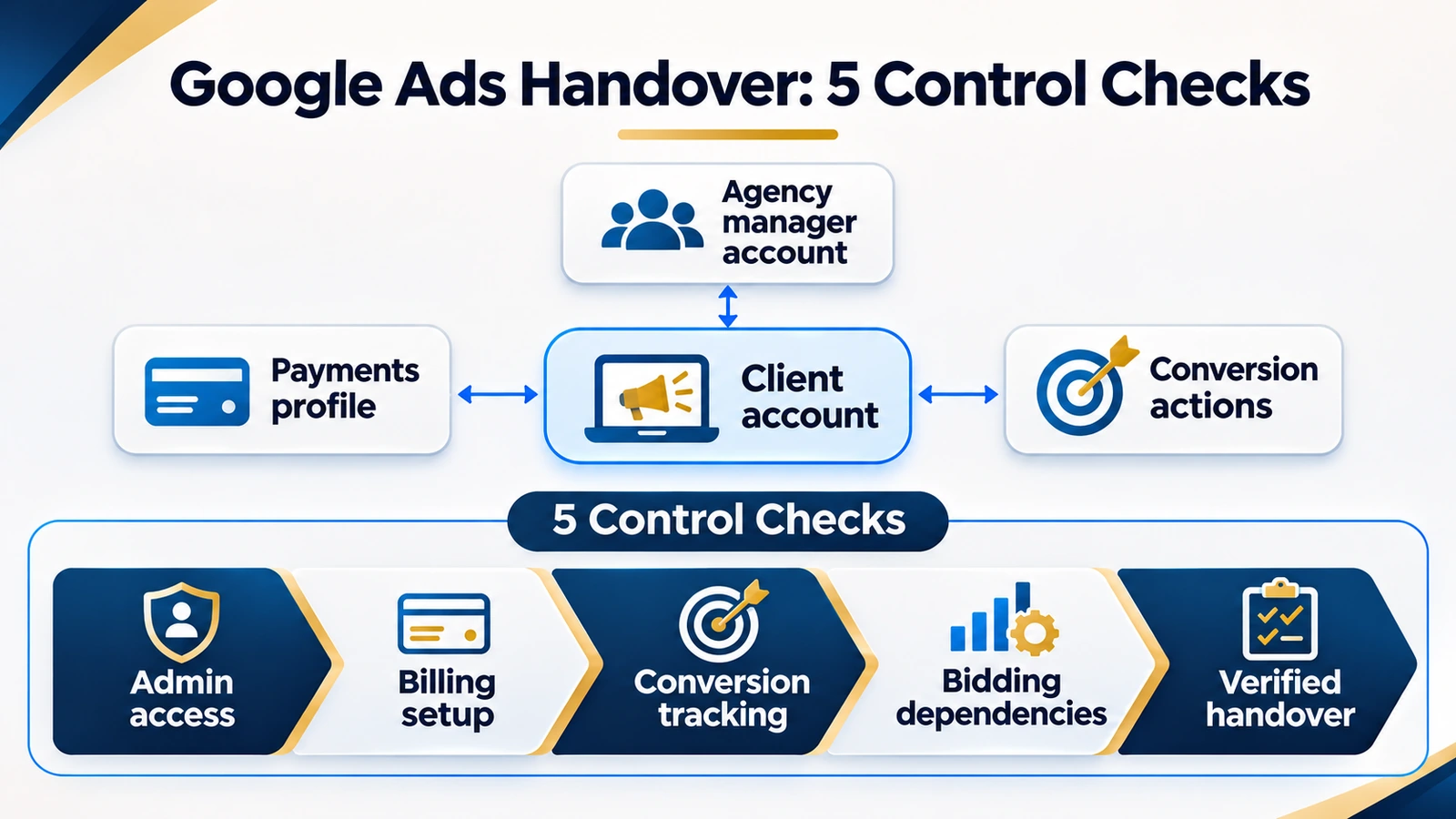
7. Google Ads agency handover: the 12-point acceptance checklist
Use the following as an operational sign-off form. Add columns for owner, evidence (screen capture or setting), status, test result and follow-up. Test with approved access rather than requesting passwords or personal customer information.
HO-01 — Customer identity. Verify the correct client account ID, account name, business details, time zone and currency. Record any unchangeable settings requiring a separate decision.
HO-02 — Business administrator. A named, business-controlled administrator can sign in directly, view the account and manage the relevant settings. Confirm whether the account was created inside the agency MCC without any client users; if so, secure a direct business-controlled Admin user before attempting to unlink. Set secure authentication and recovery coverage.
HO-03 — Linked managers. List each manager account and administrative ownership status, record the proposed outgoing and incoming manager relationships, and confirm who can unlink whom.
HO-04 — Access matrix. Document who receives Admin, Standard, Read-only and Billing access, why each role is needed, and when departing staff access is removed.
HO-05 — Billing continuity. Confirm the paying manager, payments profile, current invoice setup, outstanding liabilities and a tested path for continued ad serving after the switch.
HO-06 — Conversion ownership. Inventory each primary and secondary conversion action, identify its owner account, verify the selected conversion goals and confirm tagging or import dependencies.
HO-07 — End-to-end lead test. Submit an approved test enquiry and confirm it appears in the destination, reports appropriately and can be attributed without duplication. Where helpful, consult DevelopPrism's website lead-form testing checklist.
HO-08 — Bid strategy dependencies. Identify all shared or cross-account portfolio strategies, choose safe replacements where necessary, and confirm no affected campaign reports an invalid strategy.
HO-09 — Shared assets. Verify business-admin access to the Google Tag Manager container and GA4 property, and the Google Ads–GA4 property link. Inventory linked YouTube channels, Search Console, Google Business Profile and location assets, Merchant Center, audiences, negative keyword lists, scripts, feeds, landing pages, reporting connectors and dashboards. Record whether offline conversion imports run through the outgoing manager or client account and identify the credentials, permissions and migration owners.
HO-10 — Campaign snapshot. Export an approved pre-change baseline of active campaigns, budgets, bidding targets, relevant conversion settings, account change history and current performance definitions.
HO-11 — Controlled switchover. Agree a dated change window, primary owner, rollback contacts, monitoring checks and a go/no-go decision. Do not unlink the outgoing manager before all critical dependencies pass.
HO-12 — Post-handover evidence. After the switch, verify actual ad serving, accepted payment method, key conversions, CRM receipt, access hygiene and the first reporting reconciliation. Record unresolved issues and the party responsible.
8. A practical sign-off decision table
GREEN — Business login and permissions verified; billing has a viable continuous path; tracking and bidding dependencies tested; linked managers and shared assets documented. Proceed within the agreed change window.
AMBER — A non-critical reporting label or dashboard change is outstanding, but core spend, tracking, access and serving have evidence of continuity. Document the risk, accountable owner and retest date before proceeding.
RED — No business-controlled access, including an account created under the agency MCC with no client Admin user; unknown paying manager; manager-owned conversion dependencies not evaluated; invalid portfolio strategy risk; or critical campaigns cannot be observed after a trial switch. Stop the unlink and resolve the blocker before rescheduling.
Illustrative failure case: a UAE services company asks its new agency to remove the previous MCC immediately. The former manager owns cross-account conversion goals and a portfolio bid strategy. The new agency can edit ad text but cannot confirm billing ownership or replacement bidding. The appropriate answer is a pause for dependency testing, not a promise that old campaign settings will continue unchanged. This is a hypothetical example, not a DevelopPrism client outcome.
9. What to ask a Google Ads agency before signing
Ask for a written access plan showing the customer ID, account-admin arrangement, manager-account role, payments responsibilities, conversion ownership, reporting and termination terms. Require explicit answers to five questions: (1) Can we independently sign in as an administrator? (2) What changes when we end the relationship? (3) Who owns conversion tracking and the bidding strategy? (4) Who approves spend and holds the payments profile? (5) What evidence proves the account will continue running after handover?
Include deliverables such as an access register, conversion-action map, billing map, campaign snapshot, dependency log, dated switchover plan and a post-switch acceptance report. Ask whether fees cover the handover, technical testing and any supported assets migration. If the proposal says “you own everything,” request the actual account and payment settings that substantiate it.
How DevelopPrism can help
If you are hiring a Google Ads agency in Dubai or reviewing an existing relationship, DevelopPrism can discuss your advertising objectives, measurement requirements and the access and handover questions in this checklist. We confirm the scope of any audit, migration or billing support in writing, and we don't promise uninterrupted delivery before dependencies are tested. Explore DevelopPrism's Google Ads agency services.
Bring your account ID, a non-sensitive description of the existing account hierarchy, your lead-measurement goals, and the date you hope to switch. To discuss your account, contact DevelopPrism. If the primary problem is poor lead quality rather than ownership, our Google Ads lead-quality article addresses that different diagnostic task.
Frequently asked questions
Should my business or my advertising agency own the Google Ads account?
As a governance default, the business should maintain direct administrative access to the client account, while the agency receives the access necessary to do its work. Technical manager-account ownership, billing responsibilities and contractual rights are distinct and should be documented.
Can I remove an agency from my Google Ads account?
An appropriately authorized user can generally unlink a manager, subject to the account's access and hierarchy rules. Before doing so, confirm whether the manager controls billing, conversion goals or portfolio bidding, because unlinking can interrupt campaigns or measurement.
Will switching agencies delete my Google Ads campaign history?
Simply changing the linked management relationship for the same client account is different from opening a new client account. An individual account that unlinks from a manager retains its own campaign history, according to Google's unlinking guidance. Keeping the account avoids an unnecessary fresh-account rebuild, but shared features and external reporting dependencies still need separate checks. Do not assume every report or linked asset carries over unchanged.
Who should pay Google Ads charges in the UAE?
That depends on the contract and payments setup. A business can agree direct payment or an agency-managed invoicing arrangement, but the liable payer, invoices, approvals and exit procedure should be explicit. Check the actual payments profile and paying manager rather than inferring responsibility from an Ads login role.
What happens to conversion tracking when I unlink my agency?
Account-specific conversion actions and manager-level cross-account conversion tracking behave differently. Identify the source of current primary conversion goals, test tags and offline imports, and confirm the new arrangement before unlinking.
Can an agency keep administrative access after the contract ends?
Technically, linked managers or direct users may retain access until it is removed through the appropriate permissions interface. Contractual obligations and technical access are separate. Schedule a verified access review, including former employees and external integrations, as part of handover closure.
Official references
Google Ads Help — About linking accounts to your manager account
Google Ads Help — About access levels in your Google Ads account
Google Ads Help — About ownership of client accounts
Google Ads Help — About unlinking accounts from your manager account
Google Ads Help — Manage account billing setup from a manager account
Google Ads Help — Edit your payments profile information
Google Ads Help — About cross-account conversion tracking
Google Ads Help — Bidding / cross-account portfolio strategy behavior