
A bilingual website should not be signed off by the developer alone. The business owner authorizes release after a qualified Arabic reviewer accepts the Arabic content, an English content owner accepts the English version, the development and SEO teams verify both sets of pages, and sales operations confirms that enquiries reach the intended destination. Record the decision against a specific release version.
A design preview may look finished while the Arabic contact form still sends messages to the wrong team, a language switch returns customers to the homepage, or a service page promises something different in each language. The issue is not simply whether translation is complete. It is whether both customer journeys are ready to operate.
Use the proposed acceptance framework below when commissioning or relaunching a bilingual website in Dubai, Abu Dhabi or elsewhere in the UAE. It is a planning and testing method, not a claim of a statutory bilingual requirement or a record of a particular client project.
The 12 checks at a glance: 01 Page inventory and content parity; 02 Language switching and navigation; 03 Right-to-left structure and mixed-language content; 04 Mobile layout, typography and accessibility; 05 Required fields and localized errors; 06 End-to-end enquiry delivery; 07 Third-party widgets, downloads and fallback language; 08 Language-specific search URLs; 09 Canonicals, metadata and migration redirects; 10 Commercial and policy consistency; 11 CMS editor and translation handover; 12 Production release and recovery rehearsal.
1. Agree what is being accepted before testing starts
Ask for a list of all public pages and customer journeys in the contract, grouped by their English and Arabic counterparts. Include navigation, service pages, lead forms, thank-you states, legal notices, downloadable documents and third-party widgets where they are in scope. Record the staging URL and build identifier, the language content revision, target browsers and devices, and the named business decision-maker.
Do not assume every English URL needs an Arabic counterpart. Some information may legitimately be specific to one audience, and third-party services may support fewer languages. Agree exceptions in writing and decide what the visitor sees when switching languages from those pages. A visitor should not be sent to unrelated content without explanation.
For a redesign, add the old URLs and intended new destinations to the inventory. For a new website, identify the first live version and its priority landing pages. Freeze the approved test scope and reopen affected checks when a substantive change lands.
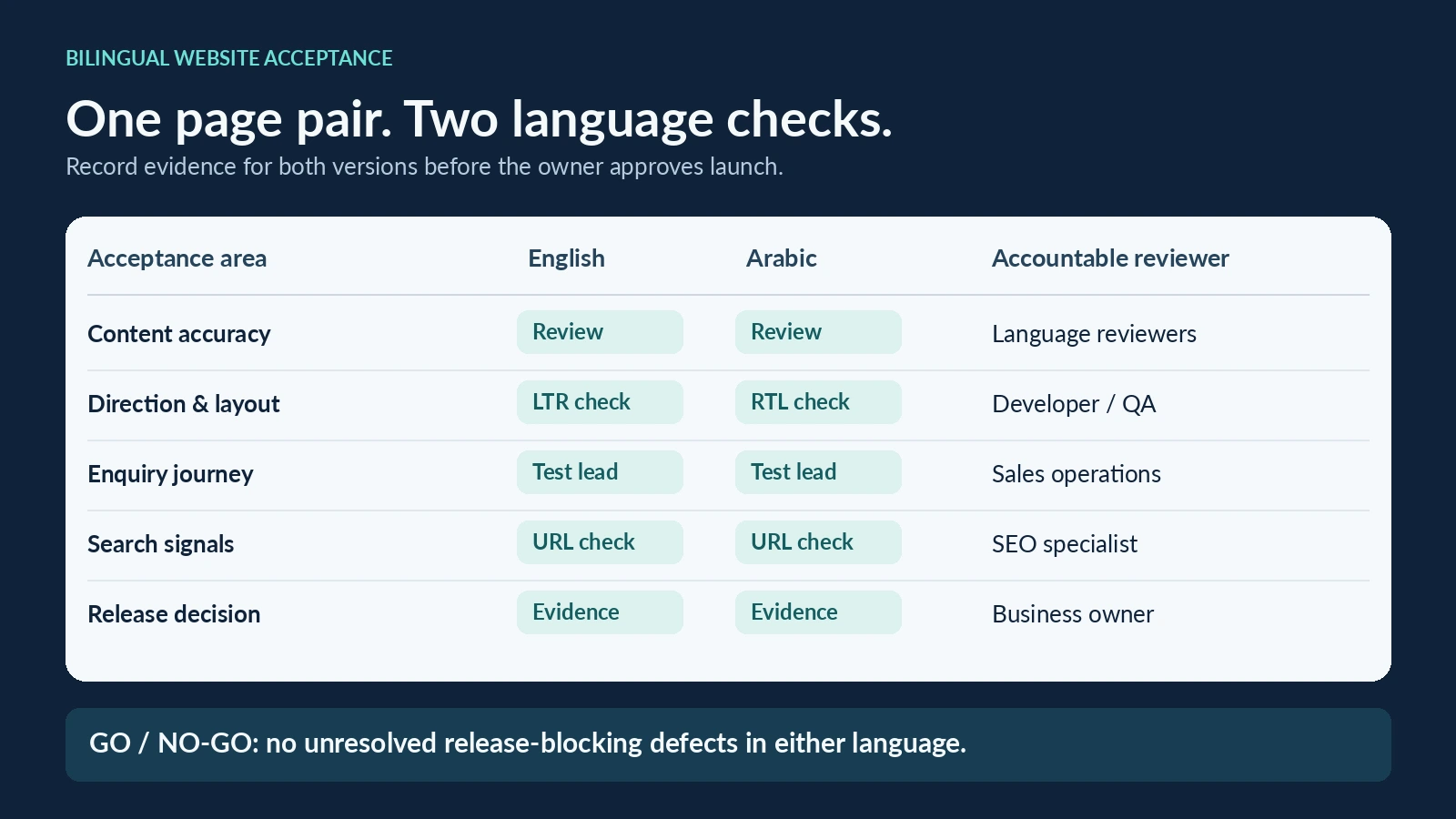
2. Who owns each sign-off?
Give every acceptance area one accountable reviewer. One person may cover several roles in a small business, but the agency, content owner and person operating the lead channel should not silently assume someone else has accepted the work.
Business owner or delegated project sponsor — owns the release decision, exclusions, unresolved non-critical risks and budget/scope changes. Evidence: signed decision with the release ID and outstanding items.
Arabic content reviewer — verifies meaning, terminology, tone, instructions and Arabic commercial claims. Evidence: dated copy approval against the actual rendered Arabic pages, not just a translation file.
English content owner — verifies English copy, service scope, prices if displayed, and the agreed equivalents or deliberate differences. Evidence: content acceptance with page IDs and revision.
Developer or QA lead — tests navigation, responsive and right-to-left (RTL) behaviour, accessibility checks and integrations. Evidence: test records, screenshots and reproducible defect retests.
Technical SEO specialist — reviews agreed indexable language URLs, canonical strategy, localized-page annotations, metadata and redirects if a migration. Evidence: rendered/source checks and crawl results.
Sales or operations owner — validates both enquiry paths, data receipt, language preference and staff routing. Evidence: test enquiry identifiers and recipient confirmation with personal data removed.
CMS or website administrator — confirms access, editing permissions, translation maintenance and rollback arrangements. Evidence: controlled editing rehearsal and release recovery plan.
These reviewers accept their respective areas. The sponsor makes the final launch decision; a marketing screenshot or a translator’s email does not replace technical and operational evidence.
3. Create a page-pair acceptance register
A page-pair register links what the business agreed to publish with what each language actually delivers. Start with one record for each mapped pair; where there is no counterpart, record the reason and approved fallback.
Copy these fields into a shared spreadsheet: pair ID | English URL | Arabic URL | page purpose | content revision | critical action | English result | Arabic result | test evidence | defect ID | accountable reviewer | sign-off date | release ID.
Use separate results for each language: PASS, FAIL, NOT TESTED or NOT APPLICABLE (with an approved reason). Keep the overall page-pair decision separate from the individual test results. Never count NOT TESTED as PASS. Store redacted evidence privately, including screenshots, browser versions, dates and test identifiers.
For example, a service page may pass its English content, navigation and form tests but fail Arabic mobile layout. The pair is not release-ready if the Arabic defect blocks the contracted customer journey. A page-pair register makes that decision visible before release.
4. Twelve bilingual website launch acceptance tests
Run these checks against the approved staging build and repeat critical journeys after launch. For shared components, test representative pages in both directions; verify all in-scope page pairs for mapping and approved content. Record actual results rather than just checking a box.
01 — Page inventory and content parity
Compare each page against its agreed scope. Confirm that service descriptions, eligibility, prices, contact details and conditions have the same business meaning unless a difference was explicitly approved. Check for unfinished translations and old placeholder content. Pass evidence: paired URLs plus both content approvals.
02 — Language switching and navigation
Open a deep service page and switch from English to Arabic, then back. Verify the expected corresponding page, menus, breadcrumbs, footer and browser back behaviour. Test a page without a counterpart using the approved fallback. Pass evidence: destination URLs and screenshots or a recorded navigation test.
03 — Right-to-left structure and mixed-language content
Do not accept right-aligned copy alone as proof of RTL. The W3C explains how the HTML direction attribute establishes the document’s base direction. Check that the Arabic page uses appropriate language and direction markup, and that mirrored patterns behave sensibly. Preserve the meaning of directional and non-directional icons. Test mixed Arabic and Latin names, UAE telephone numbers, email addresses, AED amounts and reference codes. Pass evidence: source inspection plus rendered screenshots. See W3C guidance on right-to-left markup and bidirectional text.
04 — Mobile layout, typography and accessibility
Check the smallest supported viewport, representative larger mobile and desktop views, zoom and keyboard-only navigation. Look for overflowing labels, cropped diacritics, sticky controls that cover fields, unreadable focus indicators and layout shifts when Arabic fonts load. Verify programmatic page language and relevant changes of language in the content. These checks support accessibility; they are not a full WCAG conformance audit. Refer to WCAG 2.2 for the applicable criteria. Pass evidence: both language/device test records and issue retests.
05 — Required fields and localized errors
Submit each form with an empty mandatory field, then a valid entry. Test names written in Arabic and English, a correctly formatted phone number and mixed-direction input. Instructions, errors and focus behaviour must make sense in the chosen interface. Avoid changing the validation contract without agreement. Pass evidence: screenshots of errors and successful controlled test.
06 — End-to-end enquiry delivery
From each language, use a unique test reference to submit a synthetic enquiry. Confirm the destination inbox or CRM receives it, required fields are preserved, and language preference or source-page attribution is available if contracted. Test the intended follow-up route, including WhatsApp or telephone links where present. Do not treat an on-screen success message as delivery evidence. For deeper form failure and tracking cases, use our website lead form acceptance checklist. Pass evidence: paired test references and recipient confirmation.
07 — Third-party widgets, downloads and fallback language
Try embedded calendars, maps, chat, payment or booking steps if in scope, cookie controls and brochures. Verify localized labels and documents, or disclose where a vendor interface is not available in Arabic. If a booking or transaction is supported, rehearse the approved test environment without charging a real customer. Pass evidence: working journey or recorded accepted exclusion.
08 — Language-specific search URLs
For pages intended to appear separately in search, inspect their actual accessible URLs and chosen indexability settings. Google recommends using hreflang to identify localized variants and expects reciprocal associations, including references to each version itself. For an English/Arabic UAE pair, language-only en and ar or agreed regional variants such as en-AE and ar-AE may be suitable; use valid codes consistently for the intended audience. Google supports HTML, HTTP-header or sitemap implementation; the project does not need all three. The x-default annotation can identify a language-selector or fallback page for users whose language or region does not match a listed variant. For specialist implementation, explore Arabic SEO and hreflang setup. Pass evidence: a crawl or source record showing the intended pairs and return annotations. See Google’s localized-versions guidance.
09 — Canonicals, metadata and migration redirects
Check that each genuinely distinct language page intended for indexing has the agreed canonical, robots settings, descriptive title and relevant meta description. Do not indiscriminately canonicalize Arabic content to English. If replacing an existing site, test mapped old URLs and avoid redirecting all retired service pages to the homepage. Inspect the intended production configuration separately from staging protection. Pass evidence: URL, canonical and redirect checks for the agreed inventory. Search engines may still choose how and whether to index a page.
10 — Commercial and policy consistency
Compare public conditions, service availability, offer expiry dates, legal notices and consent wording where applicable. Have the responsible business or legal reviewer resolve meaning differences; language proficiency alone is not legal approval. Confirm that contact routes and opening information match the business’s intended operating model. Ask the responsible legal or privacy reviewer to confirm that consent and privacy wording in both languages reflects the business's actual obligations, including Federal Decree-Law No. 45 of 2021 on Personal Data Protection where applicable, or other applicable data-protection requirements. This is a review prompt, not legal advice or a compliance guarantee. Pass evidence: named approval of commercial content and any required specialist review.
11 — CMS editor and translation handover
Ask the designated website editor to make a safe temporary change in staging, see which language is affected, update the counterpart if required, preview the result and reverse the change. Verify ownership and role permissions, media and translation relationships, plugin or platform dependencies and a documented way to flag content needing translation. Pass evidence: successful editing rehearsal and named ongoing owner.
12 — Production release and recovery rehearsal
Before deployment, agree the backup or restore method, deployment authority, release window and incident contact. After deployment, recheck representative page pairs, both critical enquiry paths, language switching, robots/canonicals and the expected sitemap or localized annotations. If a critical defect emerges, the release owner must be able to pause or roll back using the agreed plan. Pass evidence: release log, results and recovery reference.
5. What should stop the website from going live?
Classify issues by impact, not by the volume of comments from each language reviewer. Use an agreed severity model:
Release-blocking — a critical process is unusable or the business is materially misrepresented, a required privacy or security control fails, confidential information is exposed, or a required language page or enquiry path is missing. Resolve and retest before approving release.
Material but non-blocking — a documented defect with a safe workaround that does not undermine a contracted critical journey. The sponsor may accept this only after the accountable specialist confirms the risk and assigns a deadline. Do not use this category to waive security or legal obligations.
Minor — cosmetic details that do not affect meaning, access, navigation or conversion. Assign a named owner and fix date. Record exceptions rather than deleting them from the tracker.
For a practical go/no-go decision, require pass evidence for both languages on all critical in-scope checks and no unresolved release-blocking defects. For other items, capture each accepted exception, reason, reviewer and deadline. If evidence is missing, classify the check as NOT TESTED; postpone approval of that critical journey until it is verified.
6. Worked example: a bilingual service enquiry
Imagine a UAE facilities-management company launching a bilingual lead-generation website. This is a hypothetical example, not a DevelopPrism client outcome. Pair FM-01 covers the commercial cleaning page in English and Arabic. The sponsor approves release build R3 and assigns the Arabic reviewer, QA lead and sales manager.
The English form test EN-031 reaches the CRM. The Arabic test AR-031 shows a success screen but its language flag is lost, and the sales manager receives no routing notification for the Arabic queue. The Arabic layout screenshot is acceptable, but the critical enquiry journey has failed. Mark Arabic FAIL and pair FM-01 NO-GO; log defect D-07 with a redacted CRM comparison.
After the developer repairs the mapping, retest with fresh references EN-032 and AR-032, confirm the expected queues and keep evidence against build R4. Recheck dependent components if the form template changed. Only then can the sales manager accept the two paths and the sponsor make a new release decision. This illustrates why linguistic sign-off, technical sign-off and business-process sign-off need separate evidence.
7. After launch: who keeps the two versions aligned?
Appoint a content owner and a translation reviewer for ongoing updates. When a service changes, record which pages and languages are impacted, which version is awaiting review, and when both were released. For urgent corrections to material claims, decide whether to temporarily remove or clearly flag affected information rather than leaving misleading content live.
Keep the release register and issue history with the business, not just in a developer’s chat history. Schedule periodic checks for high-value enquiry paths and rerun affected language journeys after changes to shared templates, forms, integrations or the localization system.
How DevelopPrism can help
If you are commissioning an Arabic-English website or replacing an existing one, request a bilingual website scope review from DevelopPrism. Bring the page-pair inventory, approved Arabic and English copy owners, RTL and mobile requirements, intended lead destinations, and launch date. Ask for a written proposal that explicitly states which design, development, translation coordination, localization, SEO, form-integration and acceptance-testing deliverables are included, who signs them off, and which are excluded. DevelopPrism's website services and pricing materials describe bilingual website options. The proposal confirms exactly which of these checks are included.
Before requesting a quote, prepare the existing site URL if applicable, approximate page count, required language versions, supplied or required copy, lead destinations, important third-party systems and target release date. Tell us who will approve Arabic content and who will receive enquiries. This makes it easier to define a realistic scope rather than leaving acceptance until launch day.
Explore our web design and development services, or contact DevelopPrism to request a scoped bilingual launch proposal. For budgeting considerations, read our website development cost guide; it is not a fixed quote for your project. If bilingual brand assets are still being finalized, use our Arabic-English brand identity checklist.
Frequently asked questions
Who should approve the Arabic version of a website?
A qualified Arabic-language reviewer should approve meaning, terminology and wording. A developer or QA specialist should test the rendered Arabic experience and integrations. A delegated business owner authorizes the overall release after the applicable reviewers accept their areas.
Is translating the English website enough?
No. Arabic users also need usable right-to-left layouts, localized navigation and messages, functional enquiry paths and the agreed translated or adapted commercial content. A translated document does not prove that those elements work on the published site.
Do Arabic and English pages need separate URLs?
For separately indexable language experiences, distinct readable URLs are generally the practical choice. The developer and SEO owner should agree the structure and use appropriate localized-page annotations. Different formats are possible; the correct choice depends on the site and target audiences.
Should both versions launch on the same day?
If both languages are part of the agreed release, test and accept both before launch. A staged language rollout can be appropriate when expressly agreed, with a clear scope, truthful availability, and a plan for navigation and search signals. Do not silently present an unfinished language version as ready.
How can we prove Arabic enquiries are reaching our sales team?
Submit a synthetic Arabic enquiry with a unique reference from the actual page, then verify its receipt and intended routing in the inbox or CRM. Check that the expected fields, source and language preference survive if included in scope. Repeat after any integration change.
Does this checklist guarantee accessibility or Google rankings?
No. It provides release acceptance checks for a bilingual customer experience. Full accessibility conformance requires a separate evaluation against the applicable standard. Search visibility depends on many factors and cannot be guaranteed by correct markup alone.
Technical references
Google Search Central — Localized versions of pages: language URL relationships, reciprocal annotations and implementation options.
W3C — Structural markup and right-to-left text in HTML: base direction and forms with mixed-direction data.
W3C — Inline markup and bidirectional text: testing mixed scripts, numerals and punctuation.
W3C — Web Content Accessibility Guidelines (WCAG) 2.2: language, keyboard, focus and reflow criteria.